


Welcome to Easy Assist AI, your one-stop platform for all your artificial intelligence needs!
In this article, we will walk you through the process of creating an account on Easy Assist AI and provide you with a learning outcome guide to help you make the most out of the platform.
Here are the steps to create an account on Easy Assist AI:
- Go to the Easy Assist AI website and click on the "Sign In" button in the top right corner.

- You can sign-up using "Sign in with Google" or click "Don't have an account? Sign up" link.
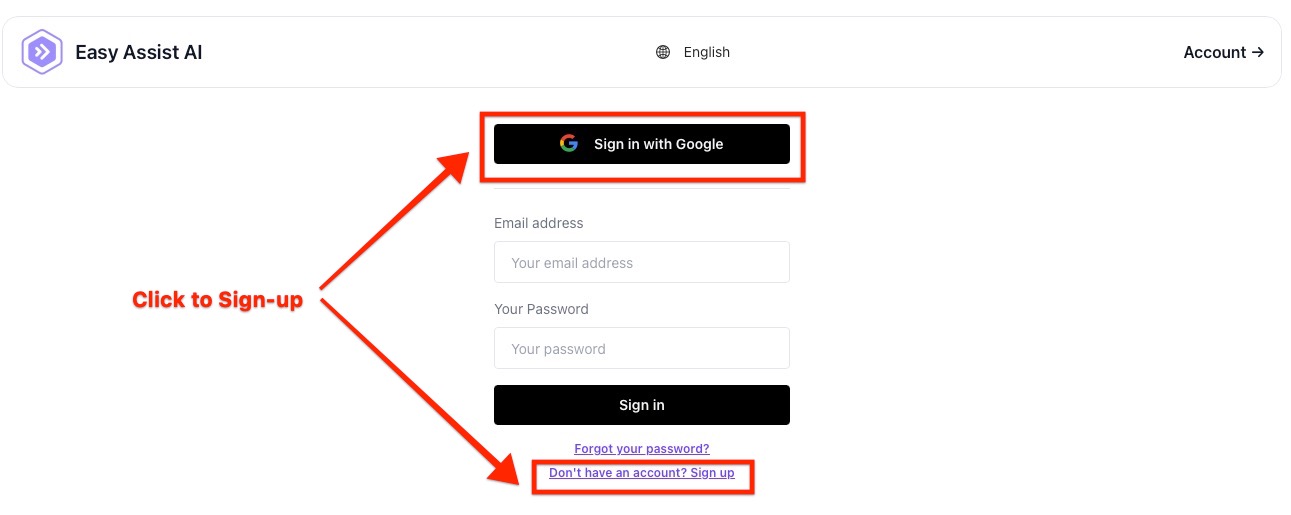
Enter your email address and password and click Sign up.
- Verify your email address: After you've clicked Sign Up, you will receive an email to verify your account. Click on the link in the email to verify your account.
- Log in: Once your account is verified, you can log in using your email address and password.